
Network#
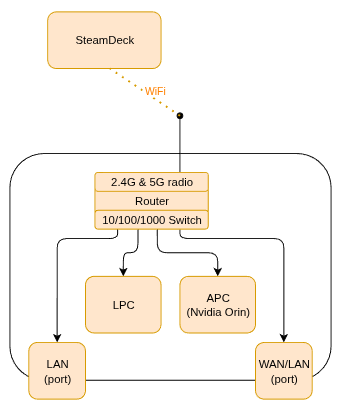
The robot is equipped with an on-board Wi-Fi router, allowing for easy access, updates, and management of multiple connected devices.
By default, the robot is configured with an independent Wi-Fi access point. SSIDs follow a pattern:
hb50_XXXX — for the 2.4 GHz network,
hb50_XXXX_5G — for the 5 GHz network.
Where XXXX is robot serial code shortened to 4 hex symbols - e.g. “hb50_AFAB” or “hb50_D71C_5G”.
Default password to the network is: milkaorzechowa.
The router also hosts DNS server, allowing for easy SSH connections.
Note
Due to ROS 2 constraints, when a node (such as remote_node) is launched before the network connection is established (IP address resolved), it usually fails to properly discover and detect other ROS 2 nodes, topics, and services.
Before starting any node that will interoperate with Honey Badger, make sure you are connected to the correct network.
ROS 2 and SSH#
Both of the robot’s onboard computers can be accessed via ROS 2 or directly with SSH.
SSH#
The robot’s DNS server uses 10.11.0.1 as the base address (also the router address), and both LPC and APC have static IP addresses:
Device |
Static Address |
Hostname |
Username |
|---|---|---|---|
LPC |
10.11.0.10 |
hb50.lan |
hb |
APC (Orin) |
10.11.0.11 |
hb50-orin.lan |
hb-orin |
Steam Deck |
Dynamic IP |
deck.lan |
mab |
ROS 2#
By default, the robot uses ROS_DOMAIN_ID 69, so the robot’s topics should be visible shortly after power-up. Ensure your client uses the same ROS_DOMAIN_ID when interacting with the robot.