Configuration and Calibration#
Config#
MD’s config allows for configuring the controller for a specific motor and the application it is used in. This section will cover the parameters that are used in config files.
[motor] section#
Name |
Type |
Min |
Max |
Description |
Required |
|---|---|---|---|---|---|
name |
string |
- |
- |
actuator name. Max 20 characters |
no |
pole pairs |
u32 |
1 |
500 |
the number of rotor magnets divided by 2. If you are unsure type zero here - during calibration it will be autodetected. Later on it is advised to retype it after the calibration to the config file. It can be accessed using candletool md info or by register access. |
yes |
torque constant |
float |
0.0000001 |
500.0 |
motor torque constant in Nm/A |
yes |
torque constant a |
float |
0.0 |
1.0 |
motor torque constant for phase A in Nm/A |
no |
torque constant b |
float |
0.0 |
1.0 |
motor torque constant for phase B in Nm/A |
no |
torque constant c |
float |
0.0 |
1.0 |
motor torque constant for phase C in Nm/A |
no |
max current |
float |
0.2 |
82.0 |
maximum allowable phase (not power supply) current |
yes |
gear ratio |
float |
0.001 |
1000 |
gear ratio -> example 6:1 reductor is 0.166666 whereas 1:2 multiplicator is 2 |
yes |
torque bandwidth |
unsigned |
50 |
2000 |
torque bandwidth setting in Hz |
yes |
dynamic friction |
float |
0.0 |
10000.0 |
dynamic friction |
no |
static friction |
float |
0.0 |
10000.0 |
static friction |
no |
KV |
unsigned |
0 |
10000 |
declared KV of the motor - it is used when torque constant is set to zero. |
no |
calibration mode |
enum |
- |
- |
FULL, NOPPDET |
no |
shutdown temp |
unsigned |
25 |
127 |
temperature threshold in [C] of the motor that will cause a overtemperature stop. Note: this safety limit works only with a motor thermistor connected. If motor temp is 0C when candletool md info is called, the thermistor is not populated or is not working. |
no |
[output encoder] section#
For more information please refer to aux encoder section.
Name |
Type |
Values |
Required |
|---|---|---|---|
output encoder |
enum |
ME_AS_CENTER, ME_AS_OFFAXIS, MB053SFA17BENT00, CM_OFFAXIS |
no |
output encoder default baud |
unsigned |
9600-1000000 |
no |
output encoder mode |
enum |
STARTUP, MOTION, REPORT, CALIBRATED_REPORT |
no |
output encoder calibration mode |
enum |
FULL, DIRONLY |
no |
[position PID] section#
Position PID default gains (used at every startup, then can be modified using the C++/Python script, or register access)
Name |
Type |
Min |
Max |
Description |
Required |
|---|---|---|---|---|---|
kp |
float |
0.0 |
100000.0 |
proportional gain |
yes |
ki |
float |
0.0 |
100000.0 |
integral gain |
yes |
kd |
float |
0.0 |
100000.0 |
derivative gain |
yes |
windup |
float |
0.0 |
100000.0 |
integral limit |
yes |
[velocity PID] section#
Velocity PID default gains (used at every startup, then can be modified using the C++/Python script, or register access)
Name |
Type |
Min |
Max |
Description |
Required |
|---|---|---|---|---|---|
kp |
float |
0.0 |
100000.0 |
proportional gain |
yes |
ki |
float |
0.0 |
100000.0 |
integral gain |
yes |
kd |
float |
0.0 |
100000.0 |
derivative gain |
yes |
windup |
float |
0.0 |
100000.0 |
integral limit |
yes |
[impedance PD] section#
Impedance PID default gains (used at every startup, then can be modified using the C++/Python script, or register access)
Name |
Type |
Min |
Max |
Description |
Required |
|---|---|---|---|---|---|
kp |
float |
0.0 |
100000.0 |
proportional gain |
yes |
kd |
float |
0.0 |
100000.0 |
derivative gain |
yes |
[limits] section#
Global limits used to issue warnings or errors.
Name |
Type |
Min |
Max |
Description |
Required |
|---|---|---|---|---|---|
max position |
float |
-10000.0 |
10000.0 |
maximum position limit in rad |
yes |
min position |
float |
-10000.0 |
10000.0 |
minimum position limit in rad |
yes |
max torque |
float |
0.1 |
1000.0 |
maximum allowed torque in Nm |
yes |
max velocity |
float |
0.0001 |
1500.0 |
maximum allowed velocity in rad/s |
yes |
max acceleration |
float |
0.0001 |
10000.0 |
max acceleration in rad/s^2 |
yes |
max deceleration |
float |
0.0001 |
10000.0 |
max deceleration in rad/s^2 |
yes |
[profile] section#
These settings are respected in POSITION PROFILE and VELOCITY PROFILE modes.
Name |
Type |
Min |
Max |
Description |
Required |
|---|---|---|---|---|---|
velocity |
float |
0.0001 |
10000.0 |
profile velocity in rad/s |
yes |
acceleration |
float |
0.0001 |
10000.0 |
profile acceleration in rad/s^2 |
yes |
deceleration |
float |
0.0001 |
10000.0 |
profile deceleration in rad/s^2 |
yes |
quick stop deceleration |
float |
0.0001 |
10000.0 |
quick stop deceleration in rad/s^2 |
no |
[gpio] section#
Name |
Type |
Values |
Description |
Required |
|---|---|---|---|---|
mode |
enum |
OFF, AUTO_BRAKE, GPIO_INPUT |
gpio mode |
no |
[hardware] section#
Name |
Type |
Min |
Max |
Description |
Required |
|---|---|---|---|---|---|
shunt resistance |
float |
0.0002 |
0.01 |
phase current shunt resistance |
no |
Calibration#
Calibration should be performed when the MD controller is first mounted to the motor or when anything changes in the motor-controller assembly. It has three main stages during which specific parameters of the setup are measured and saved.
Note
The calibration has to be performed on a motor that is free to rotate with no load attached to its output shaft. If the calibration fails, you will see errors when executing the candletool md info command. If the failure is critical the MD will remain disabled until the next calibration attempt.
Pole pairs detection#
In the first stage the motor will execute one full rotor revolution in order to check if the pole pair count is correctly configured. If the detected number of pole pairs is not consistent with the number that was typed in the *.cfg file during motor setup the calibration will fail and an error ERROR_POLE_PAIR_DET will be shown until the next calibration attempt. If you are unsure about the number of pole pairs (you can check it by counting magnets and dividing it by 2) just place zero in the *.cfg file. Then the pole pairs will be automatically detected.
Note
In some rare cases, when pole pairs are correctly specified in the config, MD may not be able to verify that correctly. In this case, refer to FAQ, for a quick workaround.
Encoder eccentricity#
Encoder eccentricity is the second measurement that takes place. During this part, the motor performs a slow single rotation in both directions to assess the amount of error due to non-axial encoder placement and external magnetic disturbances.
Motor resistance and inductance#
Motor parameters - resistance and inductance are measured in order to calculate the correct current PI controller gains to achieve a certain torque bandwidth (please see the section below). The parameters are measured in the DQ reference frame meaning the resultant resistance and inductance values have to be transformed from either line-to-line quantities or phase quantities.
Torque bandwidth#
Even though the torque command on MD controllers seems to be applied instantaneously, in reality,
it’s not the case. As in every system, there’s a response to the command which depends on the system
itself and the controller gains. A parameter called bandwidth was introduced to describe how fast
the output of a system reacts to the changing input. Calibrating the motor for a certain torque
bandwidth requires measuring motor parameters. This happens in the last calibration stage and
manifests as an audible sound (beep). The torque bandwidth default setting is set using the motor
config file. It can be set to anywhere from 50 Hz to 2.5 kHz, however it is important to note that
higher torque bandwidth causes a higher audible noise level. Please see the
candletool md calibration command for more details on calibrating the
actuators. When the system that you’re designing is a highly dynamic one, you want the torque
bandwidth to be higher than the default setting of 50 Hz. Start by calibrating the drives for 1 kHz
torque bandwidth, and if you see this is still not enough you can increase it further.
Output Encoder Calibration#
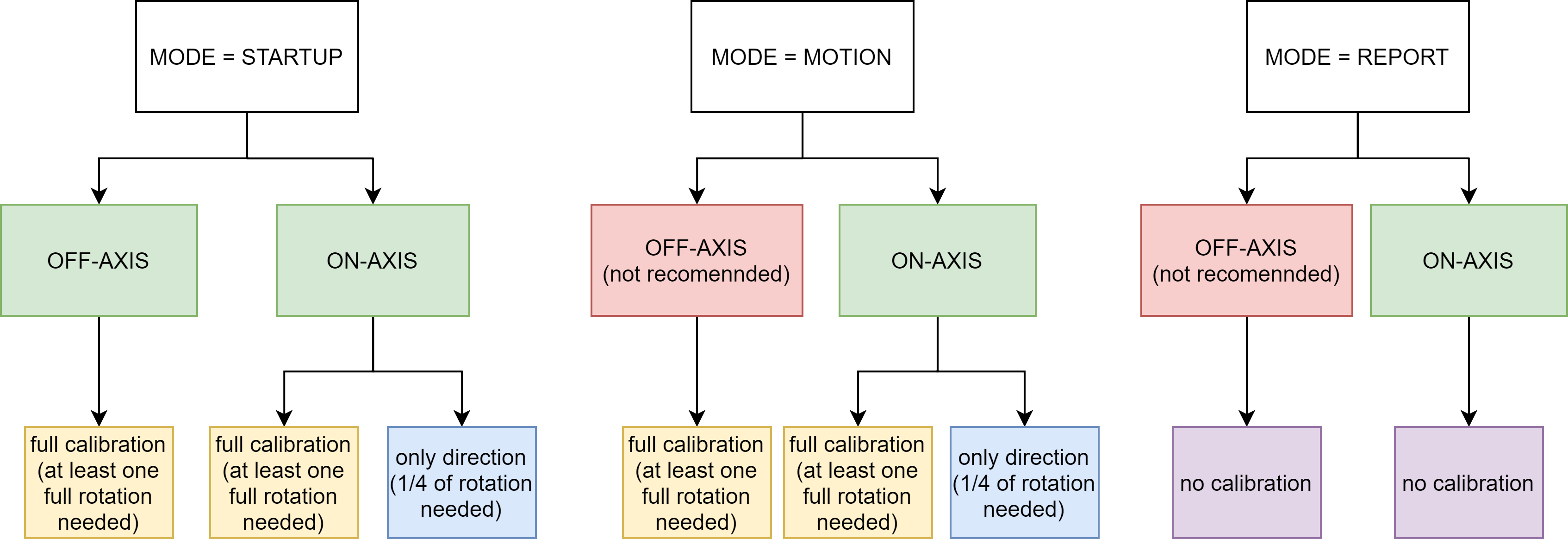
The output encoder calibration routine is used to recognize the correct direction of rotation, and record the correction lookup-table to account for non-axial placement of the encoder in respect to the magnet.
Warning
The full calibration routine rotates the actuators output shaft by more than one single rotation in the FULL calibration mode. Please make sure the shaft is free to rotate during the test.
In case your setup is not able to complete a full rotation due to mechanical constraints you can set
the output encoder calibration mode to DIRONLY in your *.cfg file in the [output encoder]
section. This way the calibration will end on the first stage - checking the correct direction of
rotation, so only 1/4 of a full rotation is needed. Please note that this is not possible using
off-axis encoder - it requires a full calibration routine.
To run the routine, use the candletool md calibration -e aux command. after
completing the routine the MD will reboot and after that it is recommended to run the candletool md
setup info command in order to make sure the setup reports no errors:
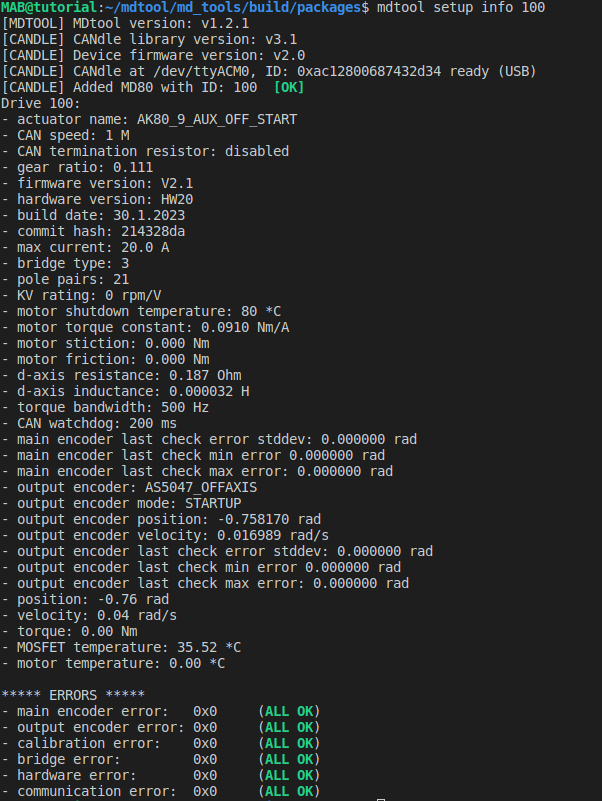
Fig. 22 :alt: candle :class: bg-primary mb-1 :align: center :class: no-scaled-link#
The output encoder parameters are rather straightforward, except the “output encoder last check”
errors. These values are filled during the output encoder check routine, which can be run using
candletool md test encoder -e aux. These params represent the output
encoder errors (max, min and standard deviation) with respect to the main encoder mounted on the
PCB. This means that if there are large inaccuracies during the calibration, or the output encoder
moves in your setup, you can always check how accurate it is by running the check_aux routine.
Example errors for ME_AS_CENTER:
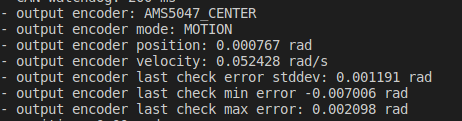
Example errors for ME_AS_OFFAXIS:
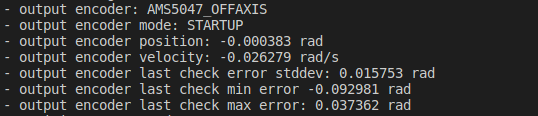
As can be seen, the non-axial encoder features larger errors, and thus can be utilized only for
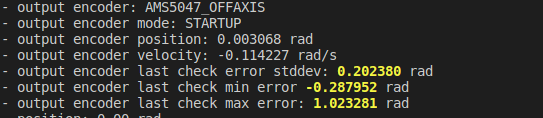
initial position determination rather than output shaft control. In case the errors get too large
they will turn yellow after running candletool md test encoder -e aux
command indicating there might be a problem with your setup:
Note
These errors will limit the maximum gear ratio that can be used to unambiguously determine the startup output shaft position. Be sure to keep them as low as possible in your setup.