
External Torque Sensor#
By default, MD drivers estimate torque from motor phase current (see Measurements). This works well for direct-drive and low-gear-ratio actuators, but on actuators with high gear ratios or that are not easily back-drivable, the phase-current estimate becomes less accurate. For these applications, MD supports connecting an external in-line torque sensor, which provides a direct torque measurement independent of motor current and gearbox friction.
Supported sensors#
Sensor |
Interface |
Notes |
|---|---|---|
XJC X-ST319-75Nm-F |
RS-485 |
In-line torque sensor, polled internally at 500 Hz |
Note
Custom sensor support.
If you would like to use a different torque sensor that is not currently supported, we are open to
introducing it to the MD Ecosystem. Please contact us at: contact@mabrobotics.pl.
Connection#
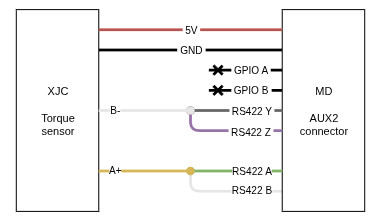
The external torque sensor is connected to the same RS-422 transceiver used by RLS RS-422 aux encoders, via the AUX2 (10-pin) connector.
Warning
The torque sensor and an RS-422 aux encoder (RLS AksIM2 / Orbis) share the same physical bus and cannot be used at the same time. Only one RS-422 device may be connected to AUX2 at once.
Warning
RS-422 is an on-demand feature of MD drivers, and by default it is not available on the board.
Contact MAB Robotics support at support@mabrobotics.pl, for more information.
Note
Due to the onboard transceiver, RS-485 is electrically emulated over the RS-422 lines by shorting TX+ to RX+ and TX- to RX- on the cable side. Cables supplied by MAB Robotics, adjust for that. Refer to the sensor’s wiring documentation when building a custom cable.
Configuration#
The sensor type is selected with the torqueSensor register:
Value |
Sensor |
|---|---|
|
|
|
|
Important
The sensor is only initialized at driver startup. After changing torqueSensor, save the
configuration (runSaveCmd) and reset the driver for the change to take effect.
If the sensor does not respond during initialization (e.g. not connected, or wired incorrectly), it
is simply marked inactive - no warning or error is raised, and torqueSensorData will read back 0.
Verify wiring and the selected sensor type if the readout stays at zero.
Zeroing#
Before use, the sensor should be zeroed (tared) with no load applied, similarly to
zeroing an encoder. Running runTorqueSensorZero averages 100 samples from
the sensor and stores the result as an offset, which is subtracted from all subsequent readings. As
with other configuration values, save (runSaveCmd) to persist the offset across power cycles.
Reading torque#
Once configured and zeroed, the measured torque is available in the torqueSensorData register
(float32, Nm), updated at 500 Hz and smoothed with a low-pass filter.